ActiveJob is a framework that ensures standardized job infrastructure for all Rails applications, which lets you define and run jobs regardless of selected queuing backend.
ActiveJob is a framework that ensures standardized job infrastructure for all Rails applications, which lets you define and run jobs regardless of selected queuing backend. The API differences between Delayed Job, Resque, Sidekiq, and others are hidden by ActiveJob and make switching between them seamless.
Using the ActiveJob framework, we recently helped a client standardize all jobs across their system. This allowed them to switch from Delayed Job to Sidekiq easily. This post will guide you through each step we followed to accomplish this without any headaches.
Challenges With Job Statistics
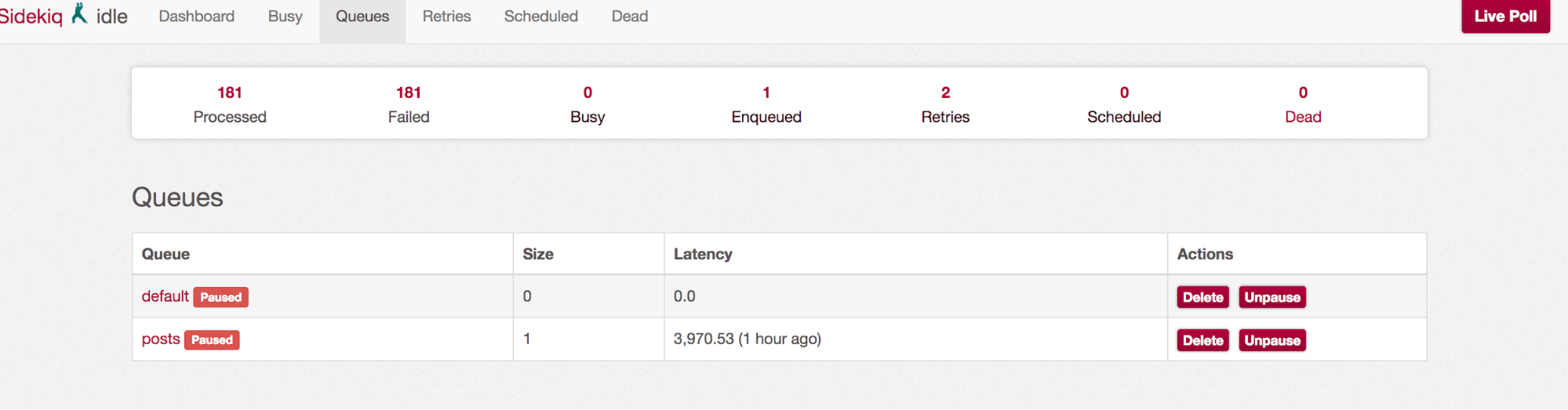
After successfully converting to ActiveJob with Sidekiq adapter, we encountered a scenario where we needed to know if a specific job was still running for target logic. We realized that with ActiveJob and Sidekiq queue adaptor the granular stats such as checking if a job is still running are non-existent. Sidekiq captures this information outside of Rails scope.
Delayed Job information such as last_error, run_at, locked_at, failed_at, locked_at are stored on the Delayed::Job ActiveRecord model and are readily available through simple query lookup.
But Sidekiq only provides general statistics for entire queues. For example, with Sidekiq you can fetch size for each status via Sidekiq::Stats:
Or, fetch information for each queue via Sidekiq::Queue:
Sidekiq stats information is not granular enough for a single job. In addition, we didn’t want lookup logic to be adapter specific if the queue adapter was switched again in the future. One way to solve this issue could be through an update of flag or timestamp on an ActiveRecord model via ActiveJob callbacks.
For example:
But in our case this was not sufficient enough if we needed to track job information for additional jobs. The closest solution came in a form of a `active_job_status` gem. By including `ActiveJobStatus::Hooks` in the job definition, we can now access the job statistics for 72 hours (setting can be altered for a longer duration). With the gem we can access all common information about a single job without being concerned with the queue adaptor:
If job status information is not an issue, then continue reading.
Step 1: Configuration
First step is a minor configuration update in config/application.rb to enable ActiveJob.
Step 2: Ensure job definitions are placed in ‘/jobs’ directory
If you are defining a new job, this Rails generator can be used to create it.
For a specific queue, use --queue:
In our client's case, we had an existing delayed job that needed to be moved from services to jobs directory. File pdftk_merge.rbwas moved from app/services/pdf to app/jobs/pdf.
Step 3: Ensure correct file name
Ensure the file name ends with job.
Rename Job file from pdftk_merge.rb to pdftk_merge_job.rb.
Step 4: Update Job definition
Our client had some custom definitions, which required some minor updates to convert to the ActiveJob structure. For example, the client used 'call' instead of the traditional 'perform' because their BaseJob definition had extensive logic and custom helper methods. Nevertheless, we were able to convert successfully by following the steps below.
Checklist:
1. Update Job name to include Job from PDF::PdftkMergetoPDF::PdftkMergeJob.
2. Ensure PDF::PdftkMergeJob inherits from ApplicationJob. If Rails generator was not used, you will need to define class manually in jobs root directory.
3. Ensure the perform method is defined. In the case of this existing definition, let's move initialize() logic to call() and rename call() method to perform().
4. Replace self.queue_name with ActiveJob helper method queue_as.
Before
After
Step 5: Enqueue Job, ensure Delayed Job is enqueued
Run Job and ensure it is enqueued in Delayed Job. Make sure it runs as expected, as well. To perform after the queuing system is free, use perform_later.
To perform after one hour, use perform_later with set.
To perform for a specific queue, use perform_later with set.
Step 6: Write RSpec test
Write an RSpec for the Job in spec/jobs/pdf/pdftk_merge_job_spec.rb or update an existing one. For example:
Tip: Retry on error
Instead of throwing StandardError, we might want to retry Job with rescue_from block and retry_job ActiveJob helper method.
Step 7: Update to Sidekiq queue
Finally, after verifying that the Job definition update to the ActiveJob structure was successful, update to the Sidekiq queue in the configuration.
Since the Job definition follows the correct pattern, switching to the Sidekiq queue should not require any changes to the existing Job structure.
Conclusion
The conversion to ActiveJob from another queue implementation (in our case Delayed Job) was straightforward and we didn’t need to make any major changes to the existing job definitions. Since switching from Delayed Job to Sidekiq queue we have more transparency into the progress of these jobs once they are enqueued up. Sidekiq provides a very detailed browser user interface to quickly view progress and ability to manage enqueued jobs. We avoided using Sidekiq specific logic by utilizing ActiveJob framework for any lookup or job statistics, so that any future changes to the queue adapter will be seamless and will not require any logic updates.
ActiveJob is a built-in framework in Ruby on Rails that provides a standardized way to define and run background jobs, regardless of which queuing backend you use. It hides the differences between tools like Delayed Job, Sidekiq, and Resque, making it easier to switch between them without rewriting your job definitions.
Why would I use ActiveJob instead of a single queue adapter?
ActiveJob creates flexibility and future-proofing for your Rails application. By using it, your job definitions are not tied to a specific queueing system, meaning you can switch from one backend to another — for example, from Delayed Job to Sidekiq — without changing your code structure.
How does ActiveJob handle job tracking and statistics?
By default, ActiveJob itself does not provide detailed statistics on individual jobs. While some queueing systems like Delayed Job store granular information, others like Sidekiq focus more on queue-level data rather than job-level tracking. If detailed insights are needed, developers often integrate third-party tools like the active_job_status gem to track the progress and status of specific jobs.
Can I switch from Delayed Job to Sidekiq easily using ActiveJob?
Yes. One of the key advantages of ActiveJob is that it makes switching between queue backends much simpler. Once your jobs follow the proper ActiveJob structure, moving from Delayed Job to Sidekiq (or another adapter) typically only requires updating your Rails configuration — no major changes to your job definitions.
How does ActiveJob improve background job management overall?
ActiveJob provides a consistent structure for defining and running background jobs while keeping your codebase clean and adaptable. It helps developers:
Write jobs once and run them on different backends
Avoid vendor lock-in with a single queuing system
Use built-in Rails features like callbacks and retry strategies
Easily integrate monitoring tools when deeper job visibility is needed
This makes it a reliable choice for teams managing scalable, long-running, or complex job workflows.
How can you cut your AI coding costs without switching models?
This guide gives you the math, the meaningful benchmarks, and a six-step plan to cut spend without giving up capability.
Enjoyed the article? Get new content delivered to your inbox.
Subscribe below and stay updated with the latest developer guides and industry insights.
Thank you! Your submission has been received!
Oops! Something went wrong while submitting the form.
Iframe is blocked. Accept cookies to load it.
Thank you! Your submission has been received!
Oops! Something went wrong while submitting the form.
We use cookies to provide our services, to allow us to better understand our audience, and to provide and serve personalized ads or content. By using our website, you consent to the terms of our Privacy Policy and our Cookie Policy, and the use of cookies, pixels, and other technology as described more fully therein
.svg)